SEMICON India 2026 is going to be held from 17th September to 19 September 2026 to bring all the global semiconductor ecosystems together on a single platform.
It aims to accelerate startups, to grow industry & investment, and to strengthen partnerships at the global level.
However, to be part of SEMICON India, first of all, you all have to register for SEMICON India 2026. Here, in this article, we have provided you with complete step-by-step instructions and a guide so that you can easily register for SEMICON India 2026.
What is SEMICON India 2026?
According to ISM, “‘SEMICON India 2026’ is being organised by the India Semiconductor Mission, Ministry of Electronics & Information Technology (MeitY), in partnership with SEMI and industry associations, under the visionary leadership and guidance of Hon’ble Prime Minister Shri Narendra Modi.
SEMICON India 2026 is centred around the theme “Silicon to Systems : Building the Ecosystem” The event aims to further strengthen India’s position as a reliable partner in the global semiconductor value chain.
In addition to the main conference, SEMICON India 2026 will feature a comprehensive exhibition, along with initiatives such as Workforce Development programmes, Country Pavilions, Hackathons, and other engagements to foster innovation, collaboration, and capacity building across the semiconductor ecosystem.”
Related Stories
Prime Minister Narendra Modi inaugrates the fifth edition of SEMICON India 2026 event at the Yashobhoomi Convention Centre in Dwarka, New Delhi. The dates of SEMICON india 2026 falls on September 17 and coincides with PM Modi birthday this year.
How to Register for SEMICON India 2026?
SEMICON India 2026 is a big event, and if you want to be part of it, the first thing you need to do is register on the official website.
What You Need Before You Start to Register for SEMICON India 2026?
It's a good idea to have some information handy before you open the registration page. This will save you time and prevent you from becoming bogged down in the middle of the form.
For normal registration, keep these things ready:
-
Your full name
-
Your organization name
-
Your designation
-
Your email address
-
Your mobile number
-
Your address details
-
A photograph of yourself
-
Your ID card details (only needed if you are applying for the inaugural program)
If you are coming from another country, you will also need:
-
A copy of your passport
-
Passport number
-
Passport expiry date
-
Your travel dates
-
Details about your nationality
Once you have all this ready, you can go to the registration portal and begin.
Step 1: Create Your Account
Source: semiconindia
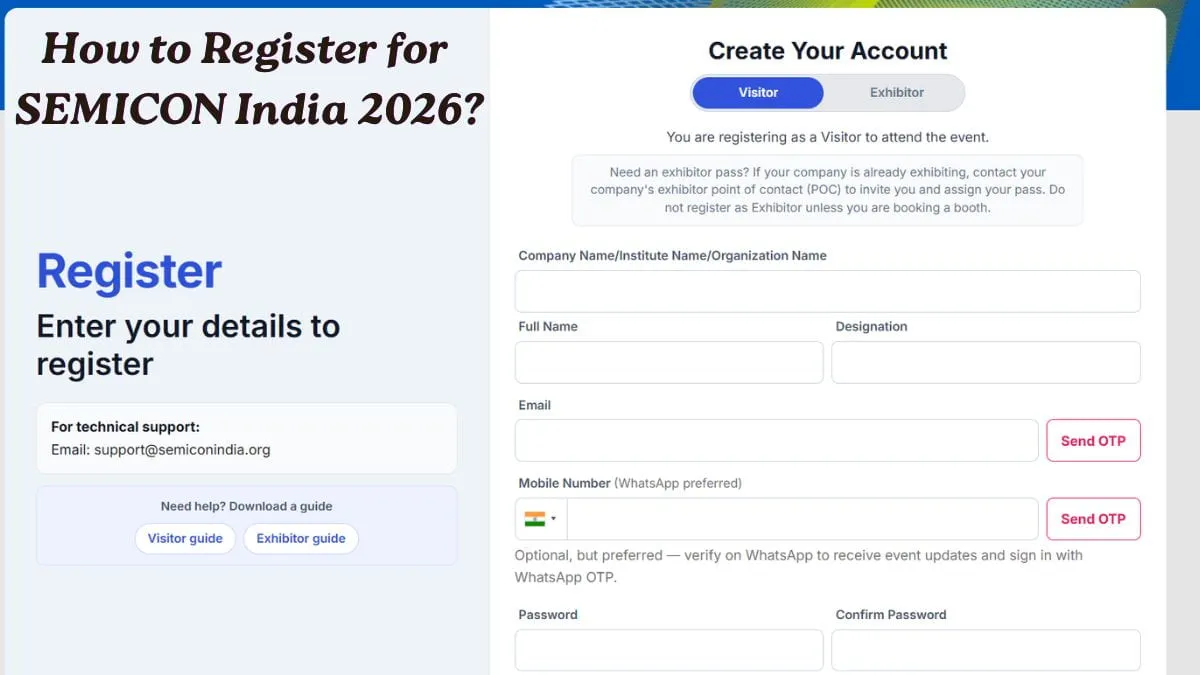
The first step is to create your account in the Portal. You can go to the Registration page and select your identity.
Here, you have a choice: If you are just attending the event, you will need to select "Visitor". The company is displaying a stall or exhibit: If you are from a company that is setting up a stall or exhibit, select "Exhibitor".
Once you've selected your role, take these little steps:
-
Fill in your own and company information.
-
Confirm your email with an OTP sent to you.
-
Create a password for your account.
-
Click on the Register button.
Once you register, you will get a confirmation message, and the website will take you to the login page.
Step 2: Login to the Portal
Source: semiconindia
You have created an account, now you must log in. There are two easy parts:
-
Enter the Registered email address.
-
Type your password.
-
Click on Login.
After logging in, you will see your visitor registration form. This is where the main details go.
Step 3: Fill the Visitor Registration Form
This step has two parts. Let us look at both one by one.
Part A: Your Personal Information
Here you need to fill in basic details about yourself, like:
-
Title
-
Name
-
Designation
-
Company name
-
Country
-
State
-
City
-
Postal code
-
Mobile number
Take your time here and check everything twice before moving forward. Small mistakes like a wrong mobile number can create problems later.
Part B: Event Participation Details
In this part, you will choose how you want to attend the event.
-
Registration Selection: Registration is by In-Person or Online.
-
The category is one of the choices given: Industry, Government, Academic, Media, Exhibitor, or Others.
-
Event Days: SEMICON India 2026 will take place on 17 September, 18 September and 19 September. One day, multiple days, or All Days can be used, depending on how long you plan to attend the event.
-
Areas of interest: Select the product categories that are of interest to you or your business.
-
Passport Photo: You'll also have to upload a passport photo. It must be JPG or PNG in up to 1 MB file size.
Once everything looks correct, click on Submit Registration.
What Happens After You Submit?
Once the form is submitted, these things you will receive:
-
You get a unique Registration ID.
-
Your registration gets saved in the system.
-
Your dashboard becomes active, and you can log in anytime to check your status.
Be sure to keep your Registration ID in a secure place. In case of any contact with the support team, you will need it later.
How to Apply for the Inaugural Session of SEMICON India 2026?
This first session of SEMICON India 2026 has limited capacity, and not all will be admitted automatically. As you register, you'll notice an option at the bottom that reads "Yes, I would like to attend the Inaugural Session. If it's something you wish to do, choose this option.
This request is then presented to the organizing committee. Your request may be Pending, Approved or Not Approved. This status can be seen at any point from the Passes section of your dashboard.
How to Get a Visa Invitation Letter?
Source: semiconindia
If you are an Indian citizen, you do not need to apply for a visa invitation letter, but if you are a foreigner or NRIs or you are an international visitor, here is what you need to do after finishing your registration:
-
Log in to your dashboard.
-
Open the Visa Request section.
-
Fill in your passport information carefully.
-
Upload the required documents.
-
Submit your request.
It is important to note that it is not possible to edit information on-line after you submit your visa request. So be careful to verify all before sending.
Once the SEMICON India team reviews and approves your request, they will prepare your invitation letter and send it to you in the form of a PDF in your e-mail message. Or, if it's not in your inbox, double-check your spam or junk folder, as it may be in there for the wrong reasons.
Need Help?
In the event of any issue while registering, passing the management process and/or the visa process the Support team at support@semiconindia.org can be contacted.
If you are writing them, always state these things so that they can help you quicker:
-
Your Registration ID
-
Your full name
-
Your company name
-
Your email address
Quick Tips
-
When registering, use a company email, if possible.
-
Take a clear and recent photo.
-
Complete your registration prior to your visa letter application.
-
Fill in the information about your passport as it is written on your passport.
-
Please remember to save your Registration ID after you have filled out the form!