Google Gemini AI Photo Editing Prompts on Mother’s Day 2026
Looking for the best Google Gemini AI photo editing prompts for Mother's Day? This complete guide for 2026 gives you 6 unique AI prompts to turn any photo of mom into a beautiful, heartfelt keepsake. From soft floral edits to golden-hour film looks, warm vintage scrapbook collages, and emotional black-and-white portraits, these prompts are easy to use and perfect for Instagram, gifts, and heartfelt tributes. No editing skills needed. Just paste, upload, and let AI do the magic.
There is one day in the year that you want everything to be extra special, and it is, it's Mother's Day! You want to let her know how special she is to you. One of the most innovative and personalised methods to do so is by transforming her image into something beautiful with Google Gemini AI photo editing prompts in 2026.
From transforming a selfie with Mom into a stunning masterpiece to resurrecting a fuzzy family photo into a sharp and clear image, to even making a blurry shot from a birthday party look clear and crisp, the right AI photo editing prompt can make a world of difference.
The prompts can be used with AI tools, including Google Gemini's image editing feature, Adobe Firefly, and Midjourney. No design experience is required. Simply select a prompt, upload your photo, and the AI takes care of the rest.
Here are 6 unique and trending Google Gemini photo editing prompts, along with some tips for how to use them to get the best results, all themed after Mother's Day.
What are Google Gemini AI Photo Editing Prompts, and why do they work so well for Mother's Day?
A Google Gemini AI photo editing prompt is a straightforward series of instructions you enter into an AI photo editing tool, together with a picture. The AI processes your text and transforms or regenerates the image, based on the description you provided.
This is ideal for Mother's Day, as you will be able to have a very specific mood or feeling to describe and the AI will pick it up. Warm, soft, flowers, light, emotion, nostalgia, one prompt. The result is a photo that is more than just good. It feels meaningful.
6 Best Google Gemini AI Photo Editing Prompts on Mother’s Day 2026
Prompt 1: Soft Floral Garden Portrait
Best for: A beautiful, Instagram-ready Mother's Day tribute post.
Prompt Text:
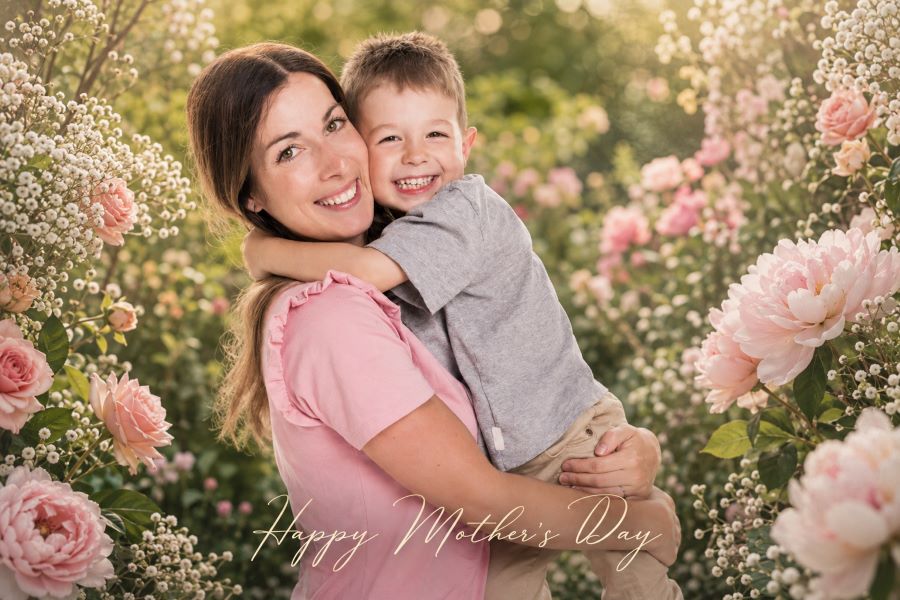
Photo and create a pretty garden for Mom. Ensure that 100% facial identity is used: face structure, skin tone, eye shape and proportions. Don't change, embellish beyond realistic enhancement. Don't alter her in any way from the way she is in nature.
Style: Soft pastel colour palette with blush pink, cream white and warm peach colours. Use delicate spring flowers such as roses, peony and baby's breath around the edges of the frame to accentuate the subject. Use a soft background with out-of-focus garden foliage to create bokeh. The lighting should be warm, but not too intense like in the morning light.
For a soft and romantic finish, use light grain for a matte finish. Have a small, elegant text overlay at the bottom which says "Happy Mother's Day" in a thin cursive font in cream colour. No heavy filters. Maintain a tender, warm and personal tone.
Important: It is important not to change the natural texture of the skin. No over-smoothing. Can be shared on Instagram, ultra-realistic and 4K quality.
Prompt 2: Golden Hour Vintage Film Tribute
Best for: A warm, nostalgic Mother's Day post with a timeless film look.
Prompt Text:
Strict: Face must be 100% the same as the uploaded picture (Strict Identity Rule). No beautification. No reshaping. No excessive smoothing of the skin. Maintain skin texture, expressions and facial ratios.
STYLE: Re-create the image of the picture with the golden hour outdoor look, as if it were shot with a warm Kodak Gold 200 film. Colour grade using Amber and Honey-yellow; gentle pulled blacks and naturally blown highlights. Add some warm sun flare in the background or upper corner and some film grain.
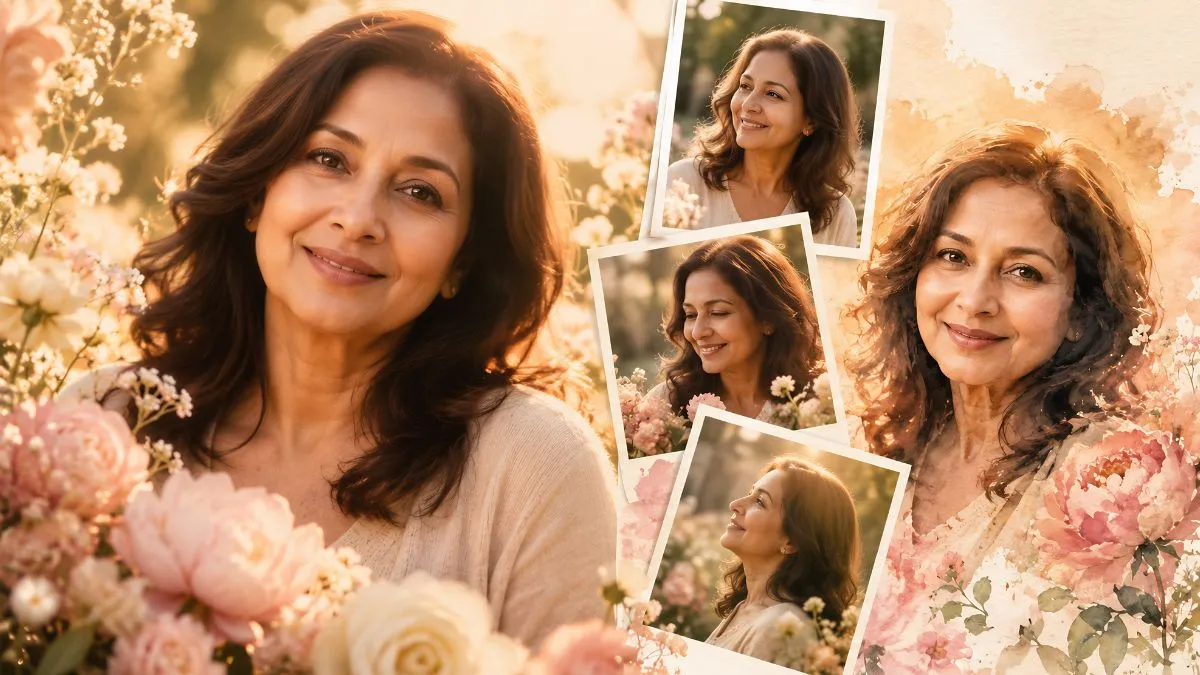
Main portrait centre frame for LAYOUT. Place three small Polaroid type pictures with white borders on one side. Every little image offers a somewhat different candid moment or angle. Process the Polaroids on a different fade film warm colour grade to give the appearance of real photographs taken at different times.
On one Polaroid, use soft cursive handwriting to write a small note that reads “Mom, always”. Scrapbook paper texture in background and subtle floral sticker accent. Ultra-realistic, 4K, Instagram-ready.
Prompt 3: Watercolour Painted Portrait
Best for: A truly artistic, gift-quality portrait that looks hand-painted.
Prompt Text:
Using the image of the picture uploaded as reference, re-create the picture as a soft watercolour painting portrait for Mother's Day. Check for complete facial accuracy – face shape, features, skin tone and proportions. Don't illustrate the face. Be realistic and yet with a delicate painted texture.
Style: The background and clothes are softened with soft watercolour brush strokes, and the face is hyper-realistic. Choose warm blush, peach and dusty rose colors. In the corners and edges of the frame, floral watercolour splashes of peony and wildflowers bloom. Much like a high-end greeting card illustration, the background is light cream/ivory white on the edges.
Lighting: Natural light, soft and diffused. No harsh shadows. The overall tone should be as if it were a love letter that's been translated into a painting. Can be printed on a gift card, wall art or framed keepsake. Ultra-detailed, 4K quality.
Prompt 4: Timeless Black and White Portrait with Flowers
Best for: An elegant, emotional Mother's Day portrait that feels like a classic photograph.
Prompt Text:
Upload a picture of yourself and create an ageless black and white fine art portrait for Mother's Day. Maintain 100% facial identity. Not too soft a face, don't lose expression and detail. No over smoothing of the skin. Preserve true likeness.
Style: rich, high-contrast black & white with deep blacks, bright whites and subtle mid-tone greys. The light is soft and natural, coming from one side to create gentle shadows, adding depth to the face. The background is slightly blurred and has a creamy white bokeh.
Add one accent: a cluster of white roses or peony petals, near the shoulder of the person or the bottom corner of the photo, in soft black and white. Add a thin black border to the image, making it look elegant and like a gallery print.
Mood: Silent, gracious, intensely emotional. Ideal for framing or printing to give as a Mother's Day wall art gift. Ultra-realistic, 4K quality.
Prompt 5: Mother and Child Memory Collage
Best for: Celebrating the bond between mom and kids with a heartfelt photo collage.
Prompt Text:
Memory collage in ultra-realistic style, using the uploaded photo. Ensure that all persons in the image have 100% facial identity. Don't alter skin tones and faces. Maintain all features as they are in nature and true.
Layout: Make a warm scrapbook style collage of several overlapping photo panels, that look like they've been printed and pinned or taped onto a soft beige canvas background. Utilize multiple close-ups of the face, one wide candid shot and one warm-toned photo. The panels are slightly sloped and appear to be hand set.
Colour: Warm cream, dusty rose and sage green hues. All Panels are soft kodak film colour graded. Place pressed flowers, small daisies, leaves, or other delicate floral stickers on one or two of the panels and a small washi tape accent strip and handwritten note on thin natural cursive script that reads, "The best mom in the world".
Sentimentality: Warm, nostalgic and tender. Ultra-realistic, 4K, Instagram-ready.
Prompt 6: Dreamy Pastel Moodboard for Mom
Best for: A trendy, aesthetic Mother's Day post that stands out on Instagram and Pinterest.
Prompt Text:
Use the uploaded photo to make a collage moodboard of Mother's Day, in a dreamy, pastel tone. Ensure that the face is 100% accurate to the face uploaded (face 1). No beautifying or skin changes. Maintain skin tone and texture; maintain characteristics of the face.
Layout: Multiple portrait frames and details stacked on top of each other in a Pinterest “moodboard” format. One central large portrait, in the shape of a rectangle. Including smaller frames, close-ups of eyes, candid smile shots and a soft profile view. The frames are in a delicate white border and the pastel colour washes vary slightly from each frame.
Lavender, blush, soft mint, peach and warm ivory colour palette. Apply light dreamy glow all over, lightening and desaturating shadows slightly. Add light floral overlays (hand illustrated style), small heart or star detail stickers and soft gradient wash of pink to lavender over background canvas.
Add a tiny elegant text element with the words For Mom, with love in light serif type. Mood: softly, softly, poetically, lovingly. 4K, Ultra-realistic, Pinterest and Instagram ready.
How to Use These Google Gemini Photo Editing Prompts for Mother's Day
These prompts are extremely simple to use. The following should be done:
-
Select a clear picture of your mother. Best used with good lighting and with the face showing.
-
Go to Google Gemini (if you have access to image editing) or Adobe Firefly or Midjourney.
-
Upload the picture on the AI tool.
-
Copy/paste one of the prompts above in the text box.
-
Click on generate and wait a few seconds.
-
Download the result, print or use as a digital gift.
Pro tip: If the AI is making too many changes to your mom's face, you can include this in the beginning of your prompt: "STRICT IDENTITY RULE: Maintain 100% facial accuracy. Avoid changing the face shape, skin color or facial expressions. This will help the AI understand that you want style, and not to change how she looks.
Tips to Get the Best Results from Your Mother's Day Prompts
-
Well-Lit Photo: The original photo should be well lit to ensure that the AI can generate better results. The AI has more to work with with a clear, front-facing photo that has good natural lighting.
-
Always include the identity rule: All prompts above include this, but if you are creating your own prompt, always say that face should remain 100% unchanged.
-
Use more than one: use multiple prompts. Take two or three suggestions on the same photo and choose the one that looks most like mom.
-
Always download at the highest quality image available: Download image at the highest quality resolution available. This is important if you intend to print it.
-
Pair with a hand written note or caption: The AI takes care of the visuals. You are in control of the words. A heartfelt caption is all it takes to make the picture really feel 100% personal.
Mothers' Day doesn't have to be complicated. The key ingredient is already in your possession (a picture of someone you love). At this time you have the prompts you need to make this picture something she will cherish.
Pick a prompt. Upload her photo. Allow AI to carry out heavy lifting. Then give her something that really demonstrates the value of her.
Happy Mother's Day!

Prabhat Mishra is a Subject Matter Expert and digital journalist with an extensive background in the competitive exam landscape and over 4 years of experience in education, national and international news, and current affairs. Over his tenure with top knowledge platforms like Mentorship India, IAS BABA, IAS SARTHI, and now Jagran Josh, he has a deep understanding of government exams like UPSC and State PCS, including UP and Bihar, as he has already qualified for the UPPCS 2022 Mains and Bihar 68th Mains. With his core expertise in history, polity, geography & current affairs, he specialises in creating well-researched, aspirant-centric content and simplifying complex topics for competitive examinations.