GATE 2027 Registration Date Extended: Apply Until October 5 at gate2027.iitm.ac.in


GAT 2027 application dates have been extended to October 5. Candidates yet to register for the entrance examination can visit the official website and apply through their DigiLocker account.
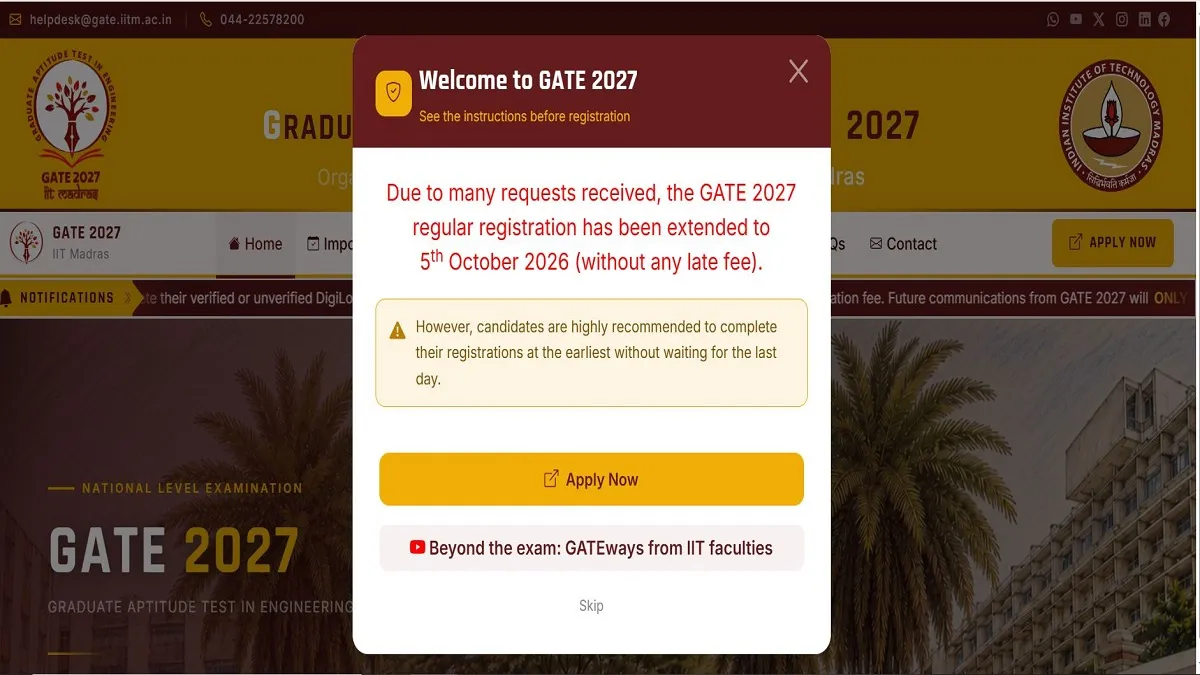
GATE 2027: Indian Institute of Technology, Madras has extended the last date for students to apply for the GATE 2027 entrance exam. As per the notification available, the last date for students to register for the entrance exam is October 5, 2026.
The notification on the official website states that the last date for candidates to apply for GATE 2027 has been extended due to several requests made by candidates. Candidates who are yet to apply for GATE 2027 are advised to visit the GOAPS portal and submit the applications as per the revised deadline.
GOAPS portal is active for students to register for GATE 2027. Candidates can visit the official website - gate2027.iitm.ac.in and enter all required details to register and apply for the GATE entrance exam.
GATE 2027 Important Dates
The last date for candidates to apply for GATE 2027 has been extended to October 5, 2026. Check the complete schedule here.
| Activity | Date |
| Opening Date of GATE Online Application Processing System (GOAPS) | 14th August 2026 27th August 2026 September 2, 2026 |
| Closing Date of REGULAR online registration (without late fee) | September 21, 2026 September 27, 2026 October 5, 2026 |
| Closing Date of EXTENDED online registration (with late fee) | September 30, 2026 October 5, 2026 October 12, 2026 |
| Opening Date of GATE 2027 Application rectification | October 14, 2026 |
| Closing Date of GATE 2027 Application rectification | Octobr 21, 2026 |
| City allotment notification | January 4, 2027 |
| Admit Card download | TBA |
| GATE 2027 Examinations | February 6, 2027 February 7, 2027 |
| February 13, 2027 February 14, 2027 | |
| February 20, 2027 February 21, 2027 | |
| Announcement of results | March 19, 2027 |
GATE 2027 Registration and Application Process
Eligible candidates can complete the GATE 2027 online registration and application process until the extended deadline. Follow the steps provided below to apply.
Step 1: Visit the official GATE GOAPS portal
Step 2: Click on New Registration
Step 3: Enter all required details
Step 4: Fill out the online application form
Step 5: Upload all required documents
Step 6: Submit the registration fee
Step 7: Review the application and click on submit
GATE 2027 Registration: Important Note
As per the details given on the official website, the registration for GATE 2027 through DigiLocker is mandatory for all Indian nationals. All the necessary data for filling the application will be fetched from DigiLocker for ease of registration (Name, DoB, mobile number, email ID, profile picture, address, verified ID card number). Students applying are hence advised to get their DigiLocker account verified before registering. GATE aspirants also have the option of registering through an unverified DigiLocker account. They can select the default ID proof during the application filling process. These candidates’ applications will be scrutinised after the registration deadline for necessary documents.
Also Read: NEET PG 2026 Qualifying Cut off Drops In The Past 6 Years: What NBEMS Data Reveals
GATE 2026 Applications: Documents Required
Candidates applying for GATE 2027 must have the following documents ready with them when applying for GATE 2027
-
Candidate’s live photo will be captured during registration time. Hence, use a computer with a webcam or your phone with a minimum of 5 MP front-facing camera.
-
Please capture your face image in a well-lit area.
-
Good quality image of the candidate’s photograph conforming to the specifications
-
Good quality image of the candidate’s signature conforming to the specifications
-
The same ID, in original, that was verified from DigiLocker MUST be produced while appearing for the GATE 2027 examination at the centre.
-
Category (SC/ST) certificate, if applicable, in PDF format to be uploaded to DigiLocker. Create a folder named 'GATE2027'. Upload category(SC/ST) certificates as CATEGORY.pdf
-
Scanned copy of UDID (preferred)/PwD Certificate, if applicable, in PDF format to be uploaded in the 'GATE2027' folder created in DigiLocker. The file should be named UDID_CERT.pdf or PWD_CERT.pdf, respectively.
-
Scanned copy of Appendix-B1 or Appendix-B2 or Dyslexic Certificate (whichever is applicable), compiled with the PwD certificate as a single PDF document and uploaded in the same drive as PWD_CERT.pdf
-
Certificate required for Compensatory time and Scribe
Sherin is an education journalist with over 7 years of experience. Over her tenure of working with top media houses like Careers 360 and then Jagran Josh, Sherin has covered various entrance examinations liek JEE Main, NEET, CUET, GATE, etc. as well as various state board and CBSE results. Her understanding of the education ecosystem coupled with her own experience of teaching as an Assistant Professor of nearly 2 years helps her provide a comprehensive perspective to students. She has a Masters Degree in Communication from Madras Christian College. Apart from covering education news, Sherin also enjoys reading and cooking.


