JEE Main 2026 Admit Card: Download Process, Self-Declaration Form & How to Fix Error 503
The National Testing Agency has released the JEE Main 2026 Session 1 admit card along with the mandatory self-declaration form. Due to heavy traffic, many students are facing a 503 Service Unavailable error, which is a temporary server issue. This article explains the step-by-step download process, how to correctly fill the self-declaration form, and practical solutions to fix it.

Key Points
- JEE Main 2026 Session 1 admit cards are released by NTA; exam starts January 21.
- Download admit card, fill self-declaration form; mandatory for exam entry.
- Experiencing 503 error: Try refreshing, off-peak hours, or contact NTA.
The National Testing Agency (NTA) has released the JEE Main 2026 Session 1 admit card, an essential document for candidates appearing in the upcoming examination. The exam is scheduled to begin on January 21. Along with the admit card, students must also download and correctly fill the self-declaration form, which is mandatory for entry into the examination hall. Due to heavy traffic on the official website, many candidates are facing a 503 Service Unavailable error while trying to access the admit card link. This article explains the complete admit card download process, how to fill the self-declaration form, and practical solutions to resolve the error issue.
RELATED:
What Is the JEE Main 2026 Admit Card and Why Is It Important?
The JEE Main admit card serves as official proof of candidature and authorisation to appear for the exam. It includes crucial details such as:
-
Candidate’s name and roll number
-
Application number
-
Exam date, shift and reporting time
-
Exam centre address
-
Candidate photograph and signature
-
Important instructions for the examination day
Candidates without a valid printed admit card will not be permitted to enter the examination centre under any circumstances.
How to Download JEE Main 2026 Admit Card
Candidates can download their admit card by following these steps:
-
Visit the official JEE Main website
-
Click on the link titled “JEE Main 2026 Admit Card – Session 1”
-
Log in using the application number and date of birth or password
-
Enter the security code and submit
-
Download the admit card PDF and take multiple printouts
It is strongly advised to save a digital copy on your phone or cloud storage as a backup.
Also Check:
JEE Main 2026 Self-Declaration Form: Download and Filling Process
The self-declaration form is included within the admit card PDF and must be printed along with it.
How to Fill the Self-Declaration Form Correctly
-
Paste a recent passport-size photograph in the space provided
-
Put a clear thumb impression in the designated area
-
Sign only where instructed; in many cases, signing must be done in the presence of the invigilator
-
Ensure the parent or guardian’s signature is added wherever required
Candidates must use blue or black ink only and avoid overwriting or making corrections.
Common Problem Faced by Students: Admit Card Link Showing Error 503
Many candidates attempting to download the JEE Main 2026 admit card have encountered a 503 Service Unavailable error. This is a server-related issue and does not indicate a problem with the candidate’s login credentials.
Why Does Error 503 Occur?
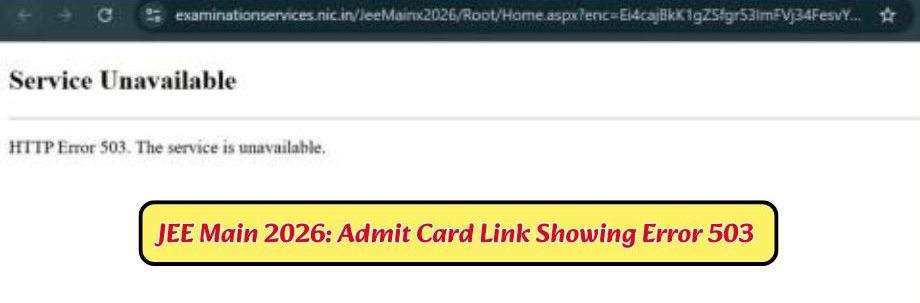
- Extremely high traffic on the NTA website after admit card release
-
Temporary server overload
-
Simultaneous login attempts by lakhs of candidates
How to Fix JEE Main Admit Card Error 503
Students facing this issue can follow these steps:
-
Wait for 10–15 minutes and refresh the page
-
Try accessing the website during non-peak hours such as late night or early morning
-
Use a different browser or enable incognito mode
-
Clear browser cache and cookies
-
Switch to a different device or internet connection
If the issue persists for a long time, candidates should contact the NTA helpline through official communication channels, also we have attached the official contact details of the NTA, students can connect with them from there too.
Important Exam Day Instructions for JEE Main 2026 Candidates
-
Reach the exam centre well before the reporting time
-
Carry a printed admit card and self-declaration form
-
Bring a valid original photo ID proof
-
Avoid carrying prohibited items such as mobile phones, calculators, smart watches or paper notes
-
Follow all instructions mentioned on the admit card carefully
Failure to comply with exam day guidelines may result in disqualification.
RELATED:
JEE Main 2026: Essential Post-Admit Card Checklist
Once the JEE Main 2026 hall ticket is released, students must immediately download and print at least two clear copies on A4-size paper, as digital versions are not permitted at the exam center. It is crucial to verify all personal details, including name, exam date, shift timing, and center address, and contact the NTA immediately if any discrepancies are found. Beyond documentation, candidates should visit their assigned exam center a day in advance to plan travel logistics and ensure they reach the venue well before the reporting time. Additionally, students must adhere to the prescribed dress code, avoid carrying prohibited electronic items, and focus on final revisions to maintain a calm and prepared mindset for the examination.
| CHECK: What Students Should Do After JEE Main 2026 Hall Ticket Released? |
JEE Main 2026 Help Desk Contact Details
| Particulars | Official Contact Information |
| Helpline Numbers | 011-40759000 / 011-69227700 |
| Official Email | |
| Office Address | National Testing Agency, NSIC-MDBP Building, First Floor, Okhla Industrial Estate, New Delhi - 110020 |
The JEE Main 2026 admit card and self-declaration form are compulsory documents for all candidates appearing in Session 1. While technical issues like the 503 error can cause temporary inconvenience, they are usually resolved quickly with patience and the right approach. Candidates are advised to download their admit cards well in advance, verify all details carefully, and complete the self-declaration form correctly to avoid last-minute stress. Staying calm, organised and informed will help ensure a smooth examination experience.

Apeksha Agarwal is an Education Journalist with over 3.5 years of experience. She covers a wide range of topics, including school board examinations, entrance tests, admissions, results, scholarships, and higher education updates. Over the years, she has closely tracked major examinations such as JEE Main, NEET UG, CUET, and various state-level entrance exams, helping students stay informed throughout their academic journey. Apeksha has a Master's degree in Journalism and Mass Communication and a certificate in Digital Journalism. She is passionate about transforming complex educational developments into clear, accessible, and useful information. Her reporting focuses on providing students, parents, and educators with accurate updates and practical insights on examinations, results, and policy changes. She believes that quality education journalism can make a meaningful difference by helping students make informed decisions about their future.



![FMGE Admit Card 2026 LIVE: [LINK ACTIVE] NBEMS October Exam Hall Ticket Released; Download Link at nbe.edu.in](https://img.jagranjosh.com/images/2026/October/26102026/Untitled-design-(67).png)