How to Link PAN Card With Your Aadhar Card? Step-By-Step Process Here
Linking PAN with Aadhaar is now essential for financial and tax-related activities. Here is the purpose, updated rules, and the exact process in simple and understandable terms.
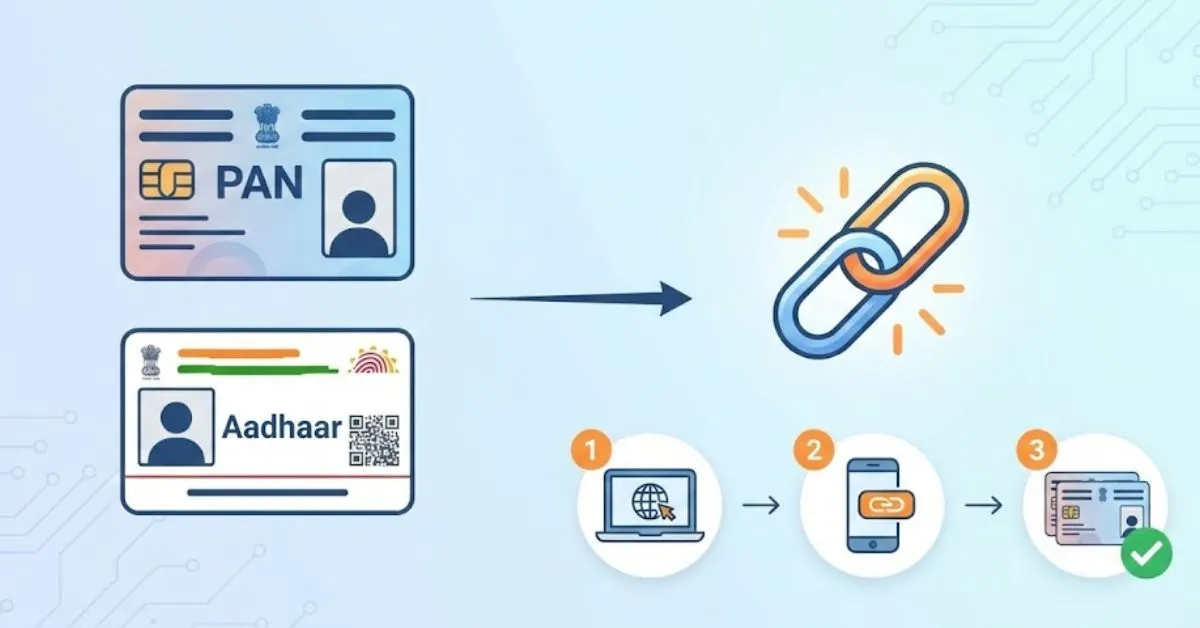
Linking the PAN card with Aadhaar is no longer just a recommended step but a mandatory requirement in India for most of the taxpayers. The Government of India has clearly mentioned that PAN cards that are not linked with Aadhar cards within a dedicated timeline will not be functional. This inoperativeness will affect income tax filing, banking, investments, and other financial services.
As per the latest clarification issued by the Income Tax Department and reported through official government-linked platforms, individuals who were allotted PAN using an Aadhaar Enrolment ID must complete Aadhaar linking by 31 December 2025. If this is not done, the PAN may stop working from 1 January 2026, leading to compliance and financial difficulties.
The Income Tax India notice dated to 3 April 2025 mentions, “The Central Government hereby notifies that every person who has been allotted permanent account number on the basis of Enrolment ID of Aadhaar application form filed prior to the 1st day of October, 2024, shall intimate his Aadhaar number to the Principal Director General of Incometax (Systems) or Director General of Income-tax (Systems) or the person authorised by the said authorities on or before the 31st day of December, 2025 or such date as may be specified by the Central Board of Direct Taxes in this behalf.”
How to Link PAN Card and Aadhaar (Step-by-Step Official Process)
The Income Tax Department has provided a simple and fully online method where you can link PAN with Aadhaar through its official e-filing portal.
Step 1: Visit the Income Tax e-Filing website home page
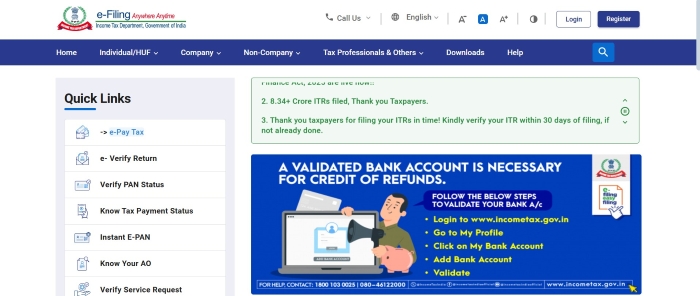
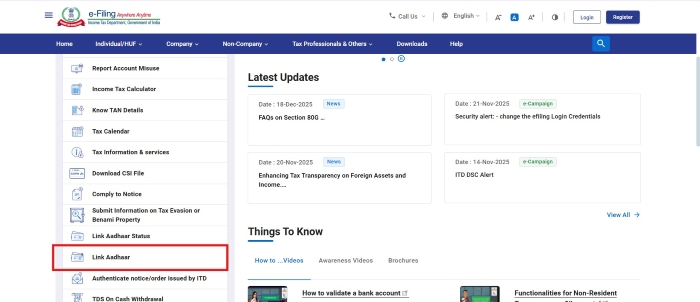
Step 2: Click on Link Aadhaar under the Quick Links section.
Step 3: Enter your PAN and Aadhaar number
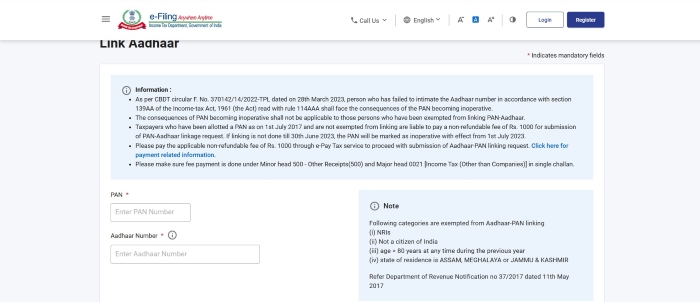
Step 4: Click on validate and you will be given an option of Pay Through e-Pay Tax
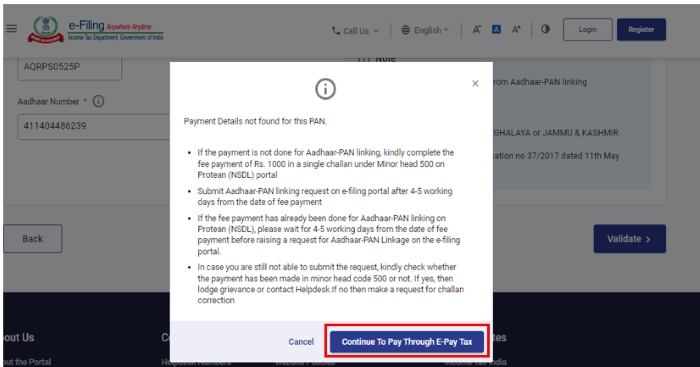
Step 5: Enter your PAN, and your registered mobile number so that you can receive the OTP
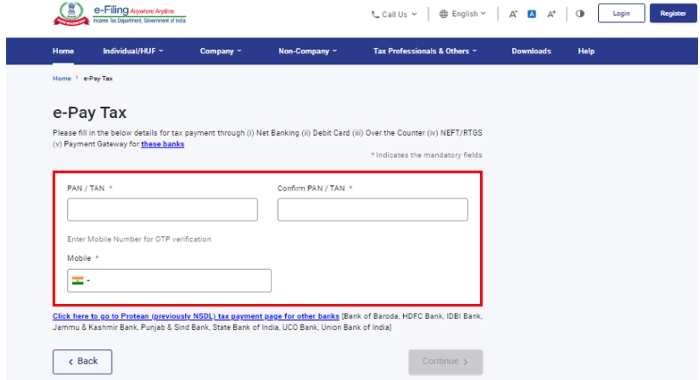
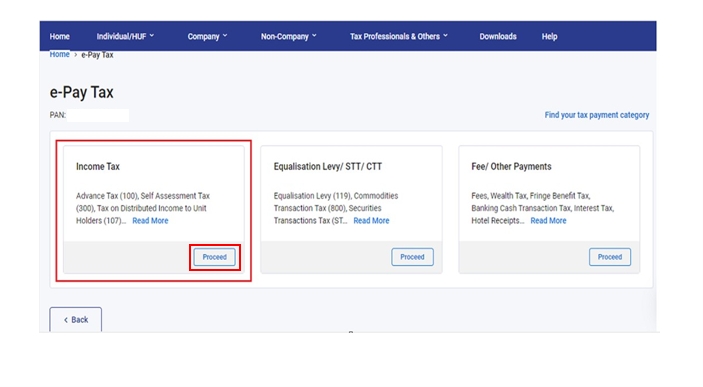
Step 6: After the verification of the OTP, you will be redirected to the e-Pay Tax page.
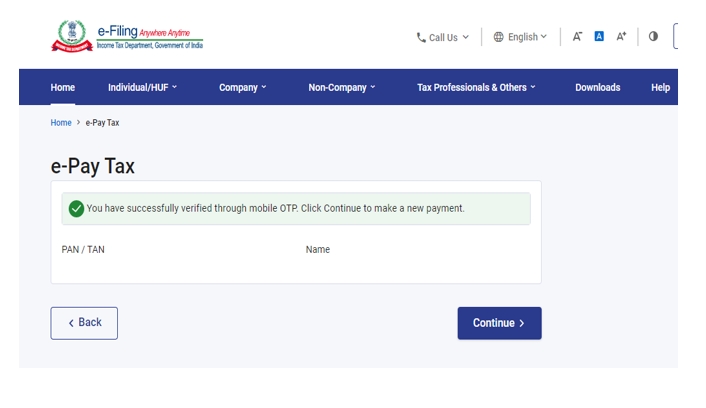
Step 7: You need to click on Continue and then on the Income Tax option in the next window
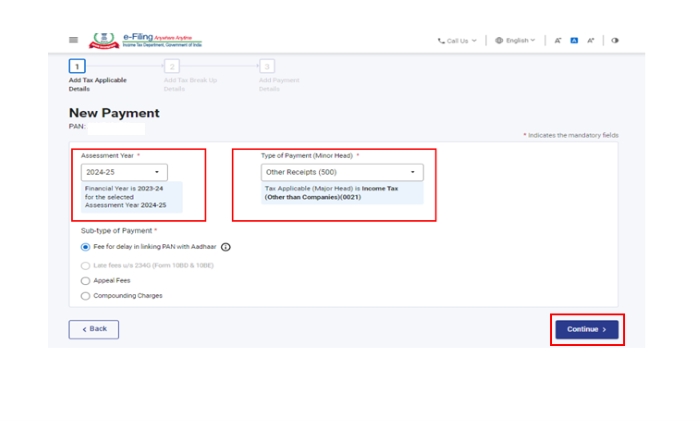
Step 8: Select the relevant Assessment Year and choose Type of Payment as Other Receipts (500) and then you need to click Continue
Step 9: You will see a fees that will be pre filled in front of the "Others" section. You need to click continue.
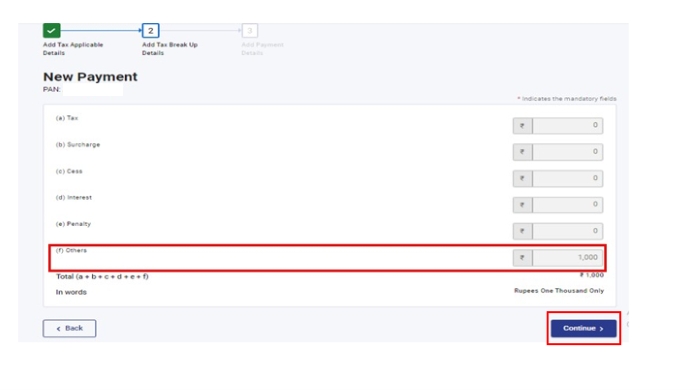
Step 10: You will be redirected to make a payment through your preferred payment mode and a challan will be generated.
Step 11: After successful payment, you can proceed to link your Aadhaar with PAN on the e-Filing Portal.
Note: You need to wait for 4 to 5 days after making the payment to submit the Aadhar-PAN linking request.
How to Submit Aadhaar–PAN Link Request After Fee Payment?
Once you have paid the fees on the official portal, you need to submit the linking request which can be done in two ways:
Method A. Submit Aadhaar–PAN Link Request (Post-Login Mode)
Step 1: You need to log in to the e-Filing Portal.
Step 2: Once you login, go to the Profile section and click Link Aadhaar to PAN.
Step 3: Alternatively, go to Personal Details and click Link Aadhaar.
Step 4: You need to enter your Aadhaar number and click Validate.
Step 5: Submit the request to complete the Aadhaar–PAN linking process.
Method B. Submit Aadhaar–PAN Link Request (Pre-Login Mode)
Step 1: Visit the e-Filing Portal home page and click Link Aadhaar under Quick Links.
Step 2: Enter your PAN and Aadhaar number, then click Validate.
Step 3: Fill in the required details and click Link Aadhaar.
Step 4: You need to enter the 6-digit OTP received on your registered mobile number and click Validate.
Step 5: Your Aadhaar–PAN link request will be submitted successfully. You can now check the link status.
How to Check if Your Aadhar Card is Linked to PAN Card?
Here is how you can check if your Aadhar Card is linked to your PAN Card or not:
Step 1: Access the Income Tax website
Step 2: Go to Link Aadhar Card Option under Quick Links on the left hand side.
Step 3: Add your details and click on 'Validate'. Your Aadhar Card and PAN Card Linked status will be displayed.
Why Is It Important? New Rules Explained
PAN Becoming Inoperative
According to the Income Tax Department, PAN cards that are not linked with Aadhaar by the prescribed deadline can become inoperative, meaning they cannot be used for income tax filing, refunds, or verification purposes .
Deadline Extension and Final Timeline
The government has allowed time until 31 December 2025 for individuals whose PAN was allotted using Aadhaar enrolment details to complete the linking process. After this date, the PAN may stop functioning from 1 January 2026 .
Compliance and Transparency
The PAN–Aadhaar linking rule is part of the government’s effort to improve tax compliance, prevent duplicate PANs, and enhance transparency in financial transactions, as stated by the Income Tax Department and UIDAI .
In conclusion linking your PAN card with Aadhaar is a one-time but essential compliance step for tax filing and other financial services. As the deadline approaches near, it will be beneficial to link your PAN Card with your Aadhar card as soon as possible to keep it active beyond 2025.
READ| How to Download Driving Licence

Nikhil is a dedicated digital journalist and communications professional with more than five years of experience, currently working within the General Knowledge section at Jagran Josh. He has established himself as a subject matter expert in Finance, Economy, History, Technology, and Trending News, consistently delivering accurate, engaging, and easy-to-read content for a wide global audience.
Over the course of his career, Nikhil has developed deep expertise in crafting informative listicles, viral trending stories. His editorial portfolio also spans finance, historical research, and technology reporting, making him a versatile and well-rounded content professional. Every piece he produces reflects a strong balance between factual accuracy and reader engagement.