

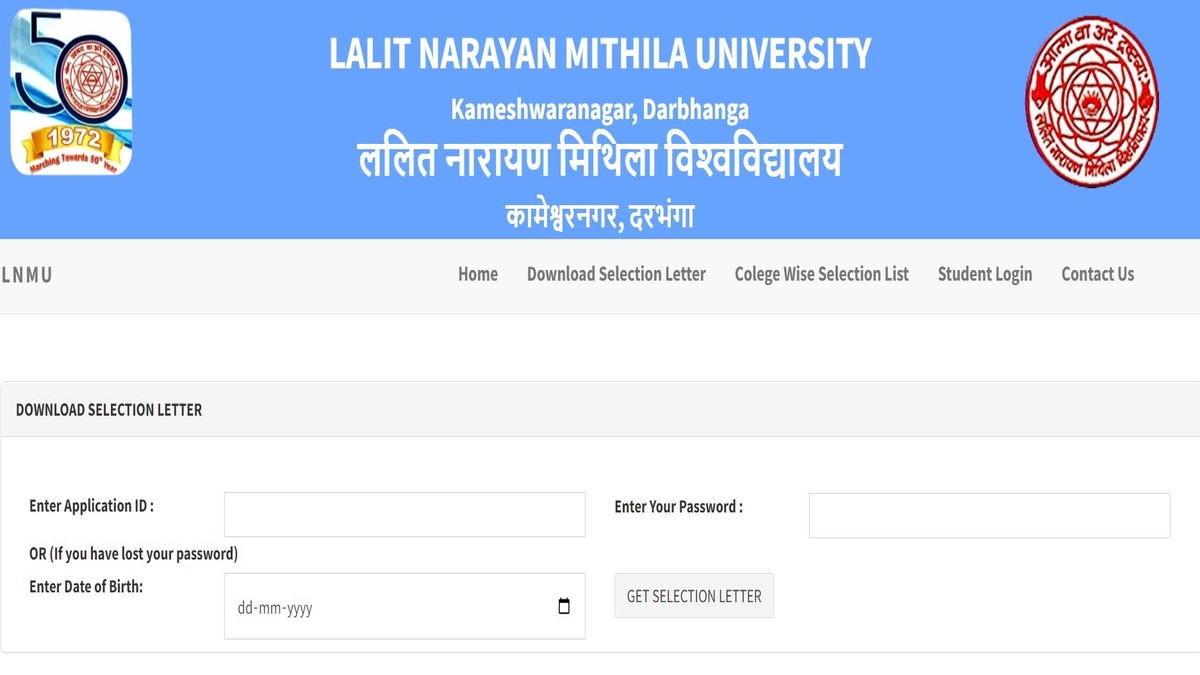
LNMU Merit List 2022: As per the updates, Lalit Narayan Mithila University has released the 1st LNMU merit list 2022 for some of the undergraduate courses - BA, BSc, and BCom. Candidates who applied for the LNMU UG admissions 2022 for the above mentioned courses can check and download the LNMU UG merit list 20222 from the official website - lnmu.ac.in.
Candidates can check and download their LNMU UG selection letter by using their application ID and date of birth. Those who will be allotted a seat are required to proceed with the admission process and submit the examination fee.
LNMU Merit List 2022 - Direct Link (Available Now)
How To Download LNMU Merit List 2022?
All the candidates whose names are there in the LNMU 1st merit list will have to lock their admission within the allotted college from 31st August to 8th September 2022. Go through the steps to know how to download LNMU 2022 merit list -
- 1st Step - Go to the official website of Lalit Narayan Mithila University - lnmu.ac.in.
- 2nd Step - On the appeared homepage, click on the link that reads - online portal.
- 3rd Step - A new login page will appear on the screen.
- 4th Step - Enter application ID and date of birth and submit the details.
- 5th Step - LNMU Slecetion letter 2022 will appear on the screen.
- 6th Step - Now download the selection letter and save it for future reference.
What After the Release of LNMU Merit List 2022?
LNMU has allotted colleges based on their details and documents attested while filling out the LNMU UG admission form 2022. Further, LNMU will verify the details and allotment will be confirmed after verification. Candidates will be required to submit their registration and examination fees via the options available on the Dashboard.
In case, any candidates want to cancel their admission, they can do so within 15 days and their college fee, registration fee and examination fee will be reimbursed. However, a 10% processing fee will be deducted.
Also Read: ICAI CA November Exams 2022 Applications Extended, Apply at icai.org




Comments
All Comments (0)
Join the conversation