Nano Banana AI Video: How to Create 3D Model Photos into Video via Gemini and Other Tools
The Gemini Nano Banana AI model has gone viral, creating over 200 million images and 3D models. With free tools like Grok AI and Kling AI, users can now animate these models into engaging videos, offering cinematic effects, realistic details, and even collectible figurines—all without expensive software.
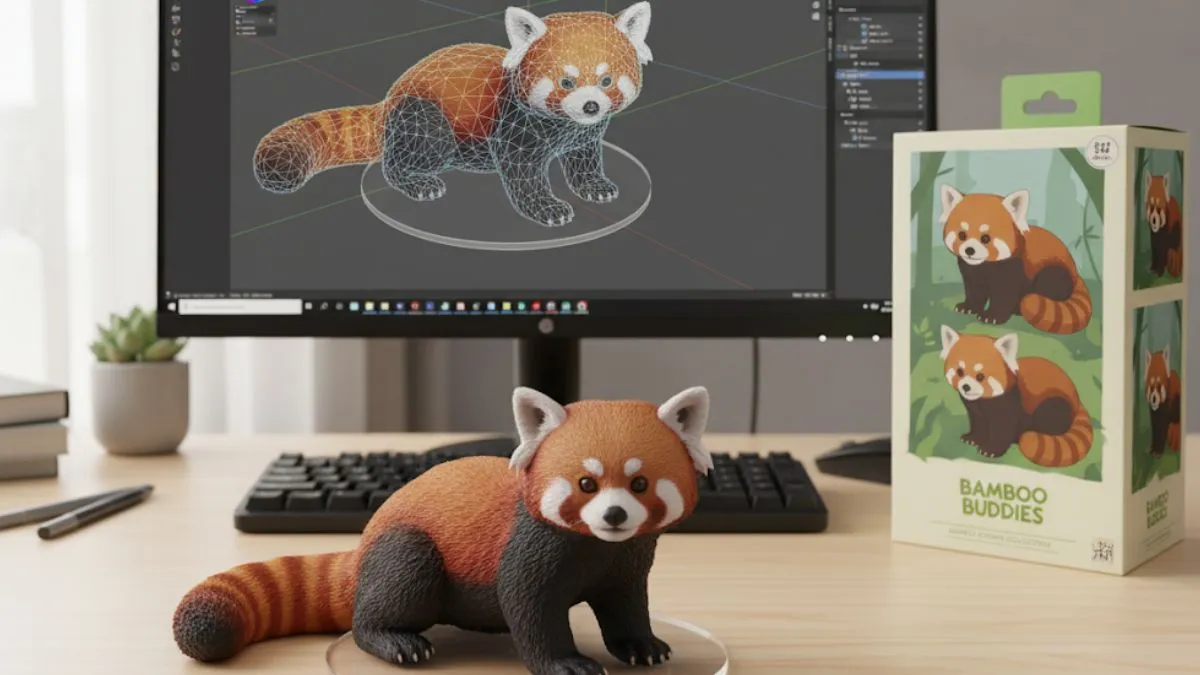
The Gemini Nano Banana AI model has quickly become a viral trend, generating over 200 million images and 3D models online. In today’s modern technology era, Google allows users to create 3D models, figurines, and visual effects from real-life photos using simple text prompts.
Its ability to preserve realistic lighting, textures, and perspective has made it a favourite for creators, designers, and AI enthusiasts.
While these 3D images are impressive on their own, the experience becomes even more engaging when they are turned into animated videos. However, most video generation tools like Google Veo 3 or OpenAI Sora are locked behind a paywall. But there are many other options also available to create videos from 3D models at no cost, and these alternatives are Grok AI and Kling AI
Method 1: Convert 3D Images to Videos with Grok AI
Grok AI (by xAI) allows you to quickly animate your photos with added sound effects.
Steps to use Grok AI:
-
Open the Grok app on your phone or access it through the X (formerly Twitter).
-
Tap on the “Imagine” section.
-
Upload your Nano Banana 3D model image.
-
Click “Make Video.”
-
In seconds, you’ll get a short animated video with sound effects. Save it or regenerate if you want a different version
Method 2: Create Cinematic Videos with Kling AI
Kling AI gives more flexibility, offering smooth, cinematic camera motions and realistic animations.
Steps to use Kling AI:
-
Open the Kling AI website or app.
-
Sign in with your Gmail or email.
-
Tap the video option from the sidebar.
-
Upload your 3D image and enter a prompt (or use DeepSeek R1 for auto-generated prompts).
-
Try this prompt for best results:
“Keep the figurine mostly static with subtle movements—blinking, light breathing, and minimal hand gestures. Animate the camera with smooth pans, zooms, and rotations in a well-lit room with realistic shadows and reflections.”
Bonus: Build Your Own 3D Figurine with Nano Banana

If you want to take things further, you can also turn yourself into a collectable figurine:
-
Open the Gemini app and select Nano Banana.
-
Upload your image.
-
Use this sample prompt:
“Create a 1/7 scale figurine of the person in the photo, placed on a desk with a transparent acrylic base. Include a premium toy-style packaging box with original illustrations.”

This way, you can even generate 3D collectable characters before animating them into videos.
Final Thoughts
With Gemini Nano Banana, Grok AI, and Kling AI, anyone can turn AI-generated 3D models into videos for free—without needing expensive software. Whether you’re experimenting with AI art, 3D animation, or creative storytelling, these tools make it simple and accessible.

Prabhat Mishra is a Subject Matter Expert and digital journalist with an extensive background in the competitive exam landscape and over 4 years of experience in education, national and international news, and current affairs. Over his tenure with top knowledge platforms like Mentorship India, IAS BABA, IAS SARTHI, and now Jagran Josh, he has a deep understanding of government exams like UPSC and State PCS, including UP and Bihar, as he has already qualified for the UPPCS 2022 Mains and Bihar 68th Mains. With his core expertise in history, polity, geography & current affairs, he specialises in creating well-researched, aspirant-centric content and simplifying complex topics for competitive examinations.


-1792414384328_t.webp)


![NIOS Hall Ticket 2026 [OUT] LIVE: Download Class 10th, 12th October Theory Admit Card at sdmis.nios.ac.in, Direct link here](https://img.jagranjosh.com/images/2026/October/16102026/NIOS-Hall-Ticket-2026.jpg)
![[OUT] UPSSSC PET Admit Card 2026 LIVE: यूपी पीईटी एडमिट कार्ड जारी, upsssc.gov.in पर Direct Link](https://img.jagranjosh.com/images/2026/October/15102026/UPSSSC-PET-Admit-Card-2026.jpg)