5 Must-Try Google Gemini AI Prompts to Restore Old Photos
Are you looking to restore old photos of your loved ones to DSLR-level clarity with AI tools like Google Gemini and ChatGPT? Then check out these 5 simple and easy prompts with a step-by-step guide now!
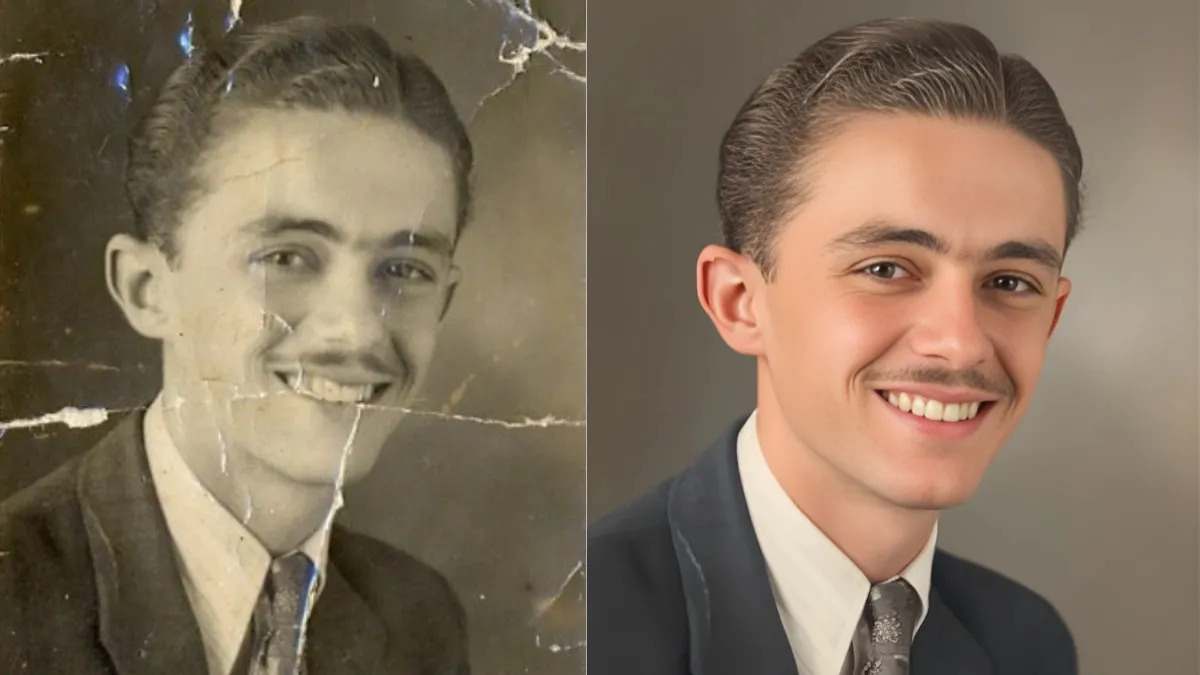
A new trend is gaining popularity on social media, where users can use AI tools like Google Gemini and ChatGPT to restore old photos into professional-looking portraits that match the quality of photos taken with high-end DSLR cameras.
The best part is that these prompts keep your original picture intact and just add magic to retouch your faded, pixelated photos to high clarity with precision.
Also Read:
What is AI Mode? How it Works and Different from Google Gemini
How to Restore Old Photos using Google Gemini AI
First of all, to restore an old photo, we will be using Google Gemini AI, and you need to follow these exact steps as mentioned below:
-
Upload an old photo to the Google Gemini AI tool.
-
Enter Prompt
-
Sit back and relax
-
Watch the magic happen.
Upload an old photo to Gemini AI
You can upload an old photo to Gemini AI by logging into Google Gemini AI from either the Google Gemini app on your phone or the web at https://gemini.google.com/app
Select Upload files from the interface.

Enter Prompt
Enter this prompt to get DSLR-level edits.

Prompt:
Restore this old photo into a professional portrait of DSLR-quality colour and detail, using an advanced upscaling algorithm comparable to the results from the Canon EOS R6 Mark II. Ensure the restored image looks natural, retains exact facial features, has great clarity and no noise. As if taken right now with Canon EOS R6 Mark II.
Sit back and relax while the AI processes your request.
Now watch the magic happen.
Here's another example
Restore Your Old Photo with Gemini or ChatGpt
— Shreya Yadav (@ShreyaYadav___) November 8, 2025
1. Old Photo
2. AI Gemini
3. AI ChatGPT
ChatGpt result pin in comment ✨
Prompt :
Edit this photo into a professional portrait of very high quality and Color, comparable to the results of Canon EOS R5. Create like a recent… pic.twitter.com/9SwGsxE1uY
Check out these 5 easy and simple prompts below to restore your old photos to professional-grade, high-quality images.
5 Easy and Simple Google Gemini Prompts to Restore Old Photos to DSLR Quality Images
Here are 5 easy and simple prompts that can be used in Google Gemini to restore old photos to DSLR-quality pictures.
Prompt 1: Restore this old photo into a professional portrait of DSLR-quality colour and detail, using an advanced upscaling algorithm comparable to the results from the Canon EOS R6 Mark II. Ensure the restored image looks natural, retains exact facial features, has excellent clarity and no noise. As if taken right now with Canon EOS R6 Mark II.
Prompt 2: Restore this old photo to match the image quality of the Canon EOS R5. Please make sure the restored photo maintains the look of the source photo; it should be realistic, with no grain or noise, as if it were taken today with a professional camera like the Canon EOS R5.
Prompt 3: Edit this photo into a professional portrait of very high quality and colour, comparable to the results of Nikon D850. Remove grains, cracks and noise. Produce ultra-realistic image, 8K Ultra HD.
Prompt 4: Edit this photo to make it look like it was clicked by iPhone 17. Remove grains, cracks and noise. Balance light, produce ultra-realistic image, 4K Ultra HD.
Prompt 5: Restore this old photo to make it look like it was clicked with a Samsung Galaxy S25 Ultra. Remove grains, cracks and noise. Produce ultra-realistic images with exact facial appearance, apply realistic skin filters, 4K Ultra HD.
Note: The prompts 4 and 5 use high-end smartphones as references, which have exceptionally good camera quality.
Final Thoughts
AI technology is revolutionising the world and can help preserve your loved ones' memories, making them even more special. Use the simple prompts above and tweak them to generate new prompts to restore your old photos to high quality.
Recommended Reading
ChatGPT Atlas vs Perplexity Comet: Key Comparison Between these AI Browsers

Mriganka Chakraborty is a seasoned digital journalist and communications professional who is currently working as Deputy Manager at Jagran Josh, where he leads the General Knowledge Section. As a subject matter expert with 8+ years of editorial experience, he has created authoritative content that is trusted by millions of readers around the world in Science, History, Geography, Polity, Economy, Sports, and Technology. His extensive expertise in these subjects enables him to present complex topics in an engaging, accurate, and reader-friendly manner to a global audience, making learning addictive and fun.
His background in a wide range of content areas and his ability to move between them make him a trusted voice to readers who want reliable, well-researched content across a variety of disciplines.
In his leisure time, Mriganka enjoys reading fiction novels and watching action and thriller movies, and cricket, which not only hone his storytelling skills but also keep his editorial vision fresh and dynamic.

-1791214652060_t.webp)

-1791204928321_t.webp)