Nano Banana AI 3D Video Prompt: मॉडल इमेज के बाद अब 3D वीडियो का ट्रेंड, मिनट से पहले बनाये, ये है स्टेप
Nano Banana AI Video Prompt Google AI Studio या Gemini मॉडल से बनी 3D फ़िगरीन इमेज को अब वीडियो में बदलने का नया ट्रेंड है। इसमें मिनटों में शॉर्ट 3D ऐनिमेशन तैयार किया जा सकता है। बस इमेज अपलोड करें, डिटेल्ड प्रॉम्प्ट डालें और तुरंत अपना वायरल वीडियो बनाएं।
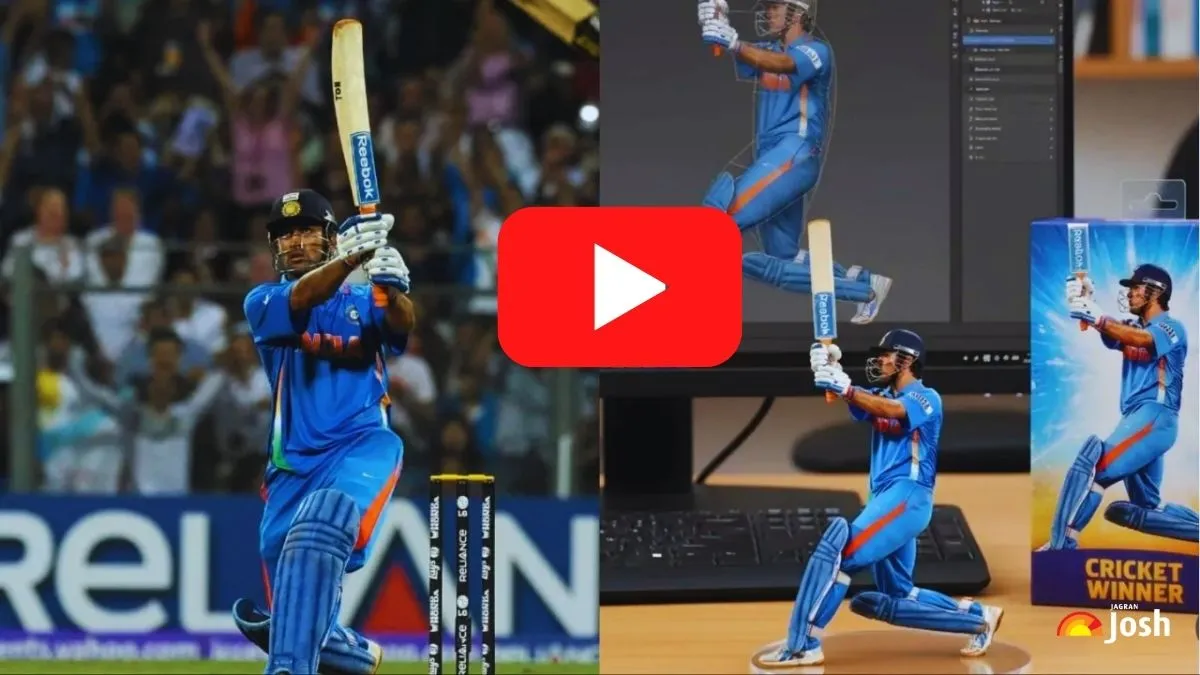
Nano Banana AI ट्रेंड, Google के Gemini 2.5 Flash Image इंजन (“Nano Banana”) पर आधारित है, जो किसी भी फोटो या ऑब्जेक्ट को हाइपर-रियलिस्टिक 3D फ़िगरीन में बदल देता है। अब इसी फ़िगरीन इमेज को आप छोटे-छोटे वीडियो या ऐनिमेशन में बदल सकते हैं। सोशल मीडिया पर यह ट्रेंड बहुत वायरल हो रहा है क्योंकि इसमें पालतू जानवर, पोर्ट्रेट या किसी भी ऑब्जेक्ट को कलेक्टिबल-स्टाइल 3D फिगर बनाकर शेयर किया जाता है।
Nano Banana AI Video क्या है?
Nano Banana AI Video Google के Gemini 2.5 Flash Image इंजन पर आधारित एक वायरल ट्रेंड है, जिसमें किसी भी फोटो या ऑब्जेक्ट को 3D फ़िगरीन इमेज में बदलकर उसे AI टूल्स से ऐनिमेट किया जाता है। ये वीडियो सोशल मीडिया पर कलेक्टिबल-स्टाइल कैरेक्टर्स की तरह दिखते हैं और काफी लोकप्रिय हो रहे हैं।
Google Gemini से 1 मिनट में तैयार करें अपनी HD 3D मॉडल तस्वीर
स्टेप 1: Google AI Studio या Gemini खोलें
-
अपने ब्राउज़र में Google AI Studio खोलें या फिर Gemini ऐप (Android/iOS) इस्तेमाल करें।
-
सुनिश्चित करें कि आप अपने Google अकाउंट से लॉगिन हैं।
स्टेप 2: Nano Banana मॉडल चुनें
-
Gemini या AI Studio में “Nano Banana” मॉडल को सेलेक्ट करें।
-
इसे पहचानने के लिए आमतौर पर एक केले का आइकॉन दिखेगा।
स्टेप 3: अपनी इमेज अपलोड करें
-
इंटरफ़ेस में “+” या Upload बटन पर क्लिक करें।
-
JPEG, PNG या WEBP फ़ॉर्मेट की फोटो अपलोड करें (जैसे पोर्ट्रेट, पालतू जानवर, कोई वस्तु)।
स्टेप 4: डिटेल्ड Prompt लिखें
अब यहाँ आप ऑफिशियल Nano Banana Prompt डाल सकते हैं:
Create a 1/7 scale commercialized figurine of the characters in the picture, in a realistic style, in a real environment. The figurine is placed on a computer desk. The figurine has a round transparent acrylic base, with no text on the base. The content on the computer screen is a 3D modeling process of this figurine. Next to the computer screen is a toy packaging box, designed in a style reminiscent of high-quality collectible figures, printed with original artwork. The packaging features two-dimensional flat illustrations.
आप इसे एडिट करके और भी क्रिएटिव बना सकते हैं।
उदाहरण:
-
“turn my pet into a plastic action figure next to its packaging”
-
“reimagine this as 16-bit pixel art”
स्टेप 5: इमेज Generate और Download करें
-
Generate बटन दबाएँ।
-
कुछ सेकेंड में आपकी फ़िगरीन इमेज बन जाएगी।
-
रिजल्ट डाउनलोड कर लें, जिससे आप आगे वीडियो बना सकें।
स्टेप 6: AI Video (Animation) बनाएं
-
Google Flow (या Gemini के सपोर्टेड वीडियो टूल जैसे Veo) खोलें।
-
अपनी Nano Banana 3D इमेज को पहले फ्रेम के रूप में अपलोड करें।
-
चाहें तो दूसरी इमेज भी डालें, ताकि ट्रांज़िशन इफ़ेक्ट बने।
-
एक डिटेल्ड वीडियो प्रॉम्प्ट लिखें (जैसे “make the figurine wave, with dynamic camera movement”).
-
अब वीडियो जनरेट होने दें।
स्टेप 7: रिव्यू, डाउनलोड और एडिट करें
-
तैयार वीडियो को प्रीव्यू करें।
-
पसंद आने पर डाउनलोड करें।
-
अगर चाहें तो वीडियो एडिटर में जाकर साउंड, सबटाइटल्स या इफ़ेक्ट्स जोड़ें।
बेस्ट Nano Banana Video के लिए टिप्स
Nano Banana AI Video बनाते समय हमेशा क्वालिटी फोटो और डिटेल्ड प्रॉम्प्ट का इस्तेमाल करना चाहिए। अगर रिजल्ट उम्मीद के मुताबिक न आए तो प्रॉम्प्ट में छोटे बदलाव करके दोबारा ट्राई करें। ध्यान रखें कि क्रिएशन करते समय प्राइवेसी और कॉपीराइट नियमों का पालन करना ज़रूरी है। साथ ही, Google अपने आउटपुट्स पर AI वॉटरमार्क भी जोड़ता है।
Google Nano Banana AI Video बनाने का प्रोसेस आसान है, पहले Gemini/AI Studio में इमेज बनाएं और फिर उसे Google Flow या किसी वीडियो AI टूल से ऐनिमेशन में बदल दें। बेसिक यूज़र्स के लिए यह प्रोसेस फ्री है, हालांकि लिमिट हो सकती है।

Bagesh Yadav is a journalist and current affairs analyst with over six years of experience in education journalism, national and international affairs, and digital media. He has contributed to India’s leading knowledge platforms, including Vision IAS and Only IAS, and currently serves in a senior editorial role at Jagranjosh.com, where he leads coverage across the Current Affairs and General Knowledge sections. His expertise spans breaking news, government policy analysis, world affairs, sports updates, science and technology, and visually engaging infographics. Known for his commitment to factual accuracy, editorial integrity, and audience-first storytelling, Bagesh delivers well-researched, accessible, and impactful journalism that serves millions of students, competitive exam aspirants, and informed readers across India.


![[Link Active] RSSB Basic Computer Instructor Result 2026 OUT: Download Rajasthan BCI and SCI Merit List PDF at rssb.rajasthan.gov.in](https://img.jagranjosh.com/images/2026/November/4112026/RSSB-BCI-and-SCI-Result-2026.jpg)
![[Live] SSC CGL Answer Key 2026 OUT: Download Tier 1 Response Sheet PDF at ssc.gov.in- Link Active](https://img.jagranjosh.com/images/2026/November/4112026/SSC-CGL-Tier-1-Answer-Key-2026.jpg)